 CloosphereAll Your AI, Safely in One Place.
 Stop personal data before it reaches the model,
and keep before/after values for setting changes
Block resident registration numbers before they reach a model, record before/after values for every setting change with who made it, and set which models and token limits each department can use. Calls from developer tools like Claude Code and Codex are controlled under the same policy.
Three requirements: personal data, audit, and per-department limits
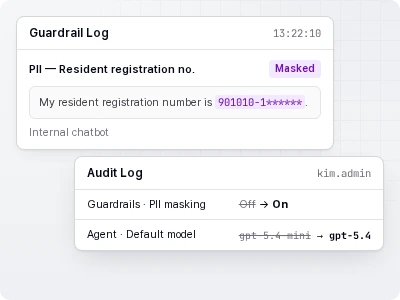
Employees paste in personal information
It's detected at the input stage and blocked, deleted, or masked per policy.
During an audit, you can't answer "who changed what, and when"
Setting changes are logged with before/after values and IP.
Every department has different requirements
Set functions, resources, models, and token limits separately at the Organization → Department → Group level.
Letting people use it while keeping control
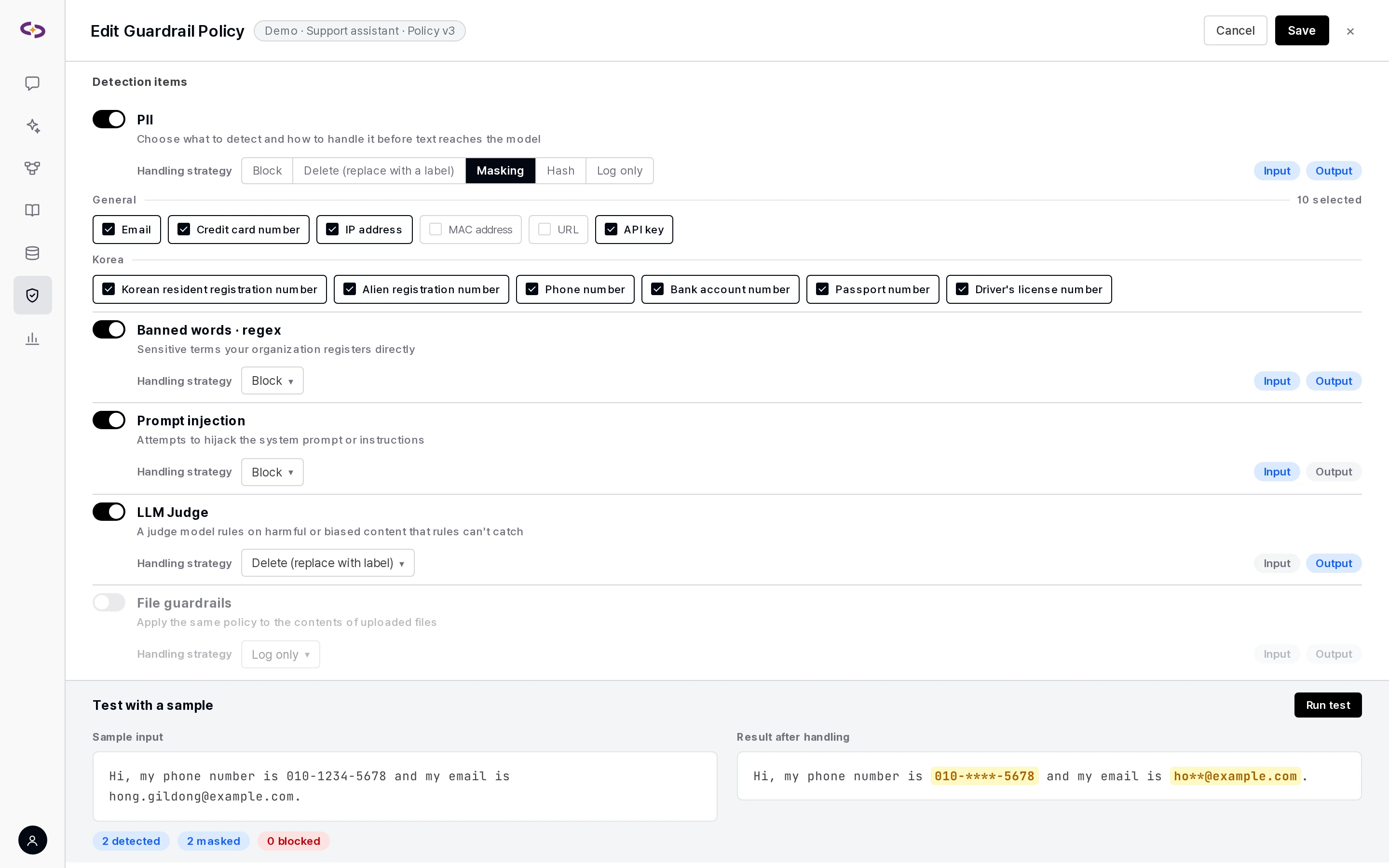
Guardrails
- 12 PII detection types — 6 general: Email · Credit card number · IP address · MAC address · URL · API key / 6 Korea-specific: Korean resident registration number · Alien registration number · Phone number · Bank account number · Passport number · Driver's license number
- 5 handling strategies: block (stop the request outright) · delete (replace with a
[REDACTED_…]label) · mask (hide part of the value) · hash (track matching values without keeping the original) · log only (record without modifying). - Banned words · regex: Register sensitive terms specific to your organization directly.
- LLM judge: Content that's hard to catch with rules is judged by a review model.
- Scope: per-agent policies, organization-level policies, and global policies applied to every conversation.
- File guardrails: The same policies also apply to the content of uploaded files.
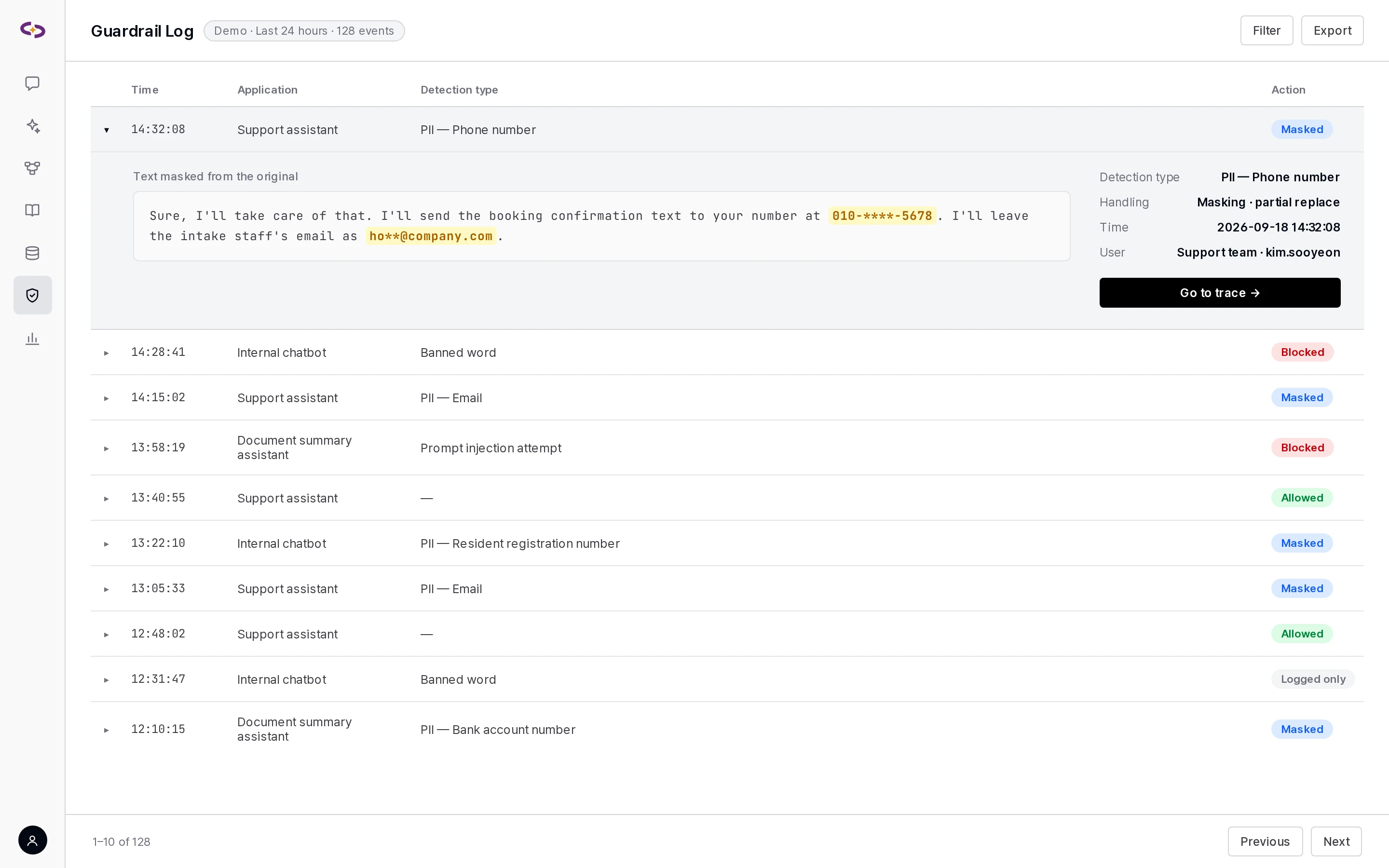
- Logs: Records who, when, what, and how it was handled, with a direct jump from the log entry to that trace.
Audit logs and activity history
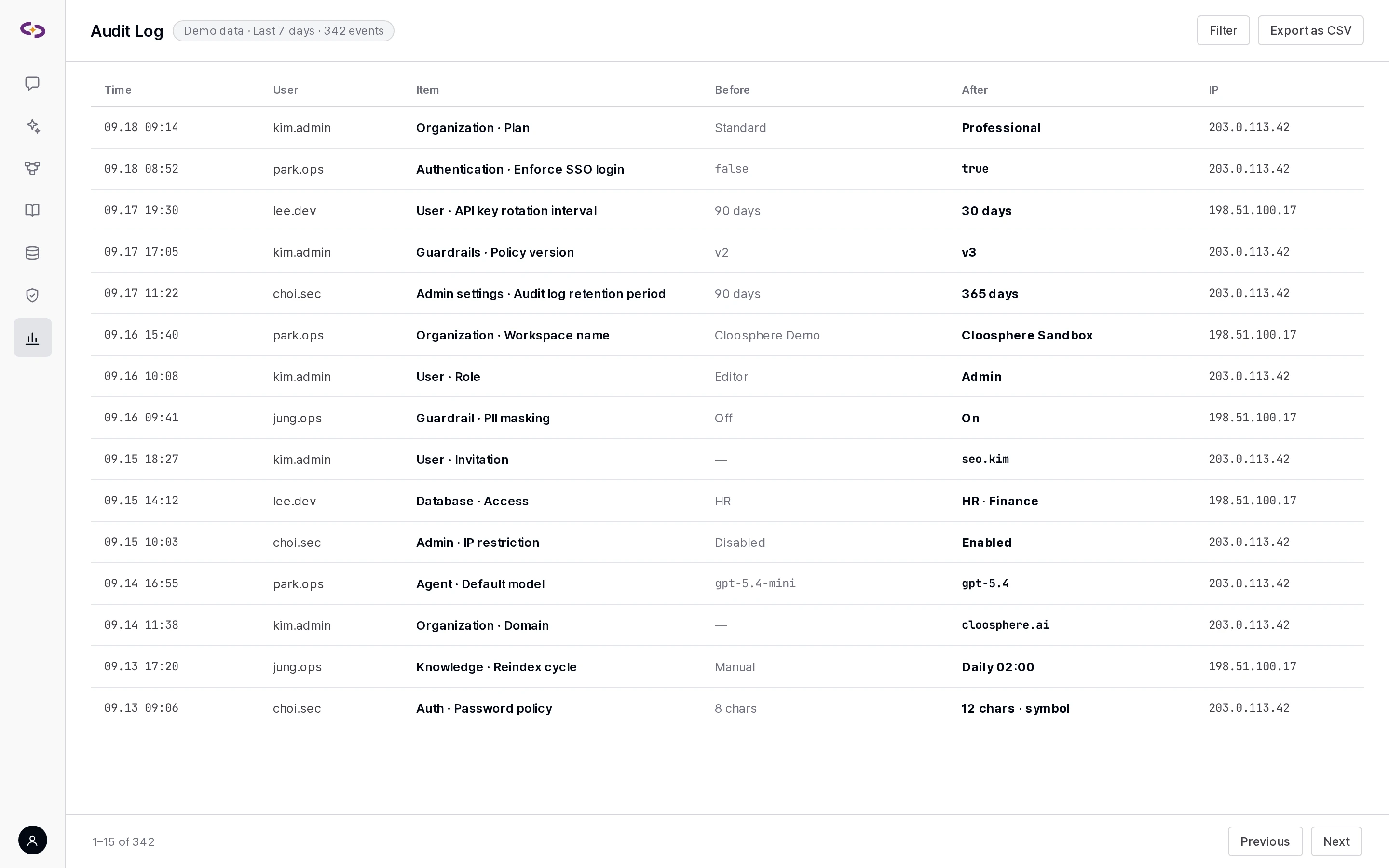
- Audit log: Records changes across 19 resource types — agents, the Knowledge Base, databases, guardrails, the glossary, prompts, tools, skills, users, organizations, groups, authentication, admin settings, embed widgets, and more — with before/after values, IP, and browser information. User role changes are recorded too.
- Workspace activity history: Even non-admins can check before/after change history for Knowledge Base · Agents · Databases · Guardrails · Glossary · Skills from the "Activity history" panel on each screen. This includes files added, deleted, or moved; sharing-scope changes; and agent configuration changes.
Permissions
- Organization → Department → Group — 3 tiers. Automatically syncs the org chart from Microsoft Entra ID or Google Workspace.
- Judged on two axes: access requires both menu/function-level permission and sharing permission on the individual resource — an agent, a Knowledge Base, and so on.
- 4 levels: None · Access · Read · Write.
- Resources share read/write access at the user, group, or department level — the same model covers tags, tools, the glossary, and scheduled tasks.
Model management and token limits
- Only organization-approved models appear in the list, with access set per user, group, or organization.
- Each model has a daily token limit, with exceptions settable per user, group, or organization. Once the limit is hit, chat stops with a notice and resets at midnight.
- The model screen shows which agents, flows, and evaluations use that model.
Code Gateway
- Routes model calls from developer tools like Claude Code · Codex · Gemini CLI · Cursor through Cloosphere so they're controlled and logged in one place.
- Applying guardrails to input and tool results never interrupts streaming, and a blocked call shows a reason and request ID. A single banned-word hit never locks an entire session.
Encryption · secrets management
- Secrets like DB connection info, tool connection keys, and user API keys are envelope-encrypted with an Azure Key Vault key (AES-256-GCM data encryption + RSA-OAEP-256 key wrapping). The master key never leaves the vault.
- Personal-information and financial classifications use separate keys, so revoking just one key never affects other secrets.
- Changing a key version triggers automatic re-encryption, and every encryption operation is logged in a tamper-evident hash chain.
- DB connection passwords and similar values are masked wherever they appear in the settings screen.
Log retention
- Set a retention period per record type — usage, audit logs, guardrail logs, traces, trace diagnostics, and automatic evaluation records — and they're cleaned up automatically at a scheduled time each day.
- Check record counts and storage size by record type from the admin screen.
Guardrail and code gateway screens
A reply containing a phone number is masked, and the log below fills with detection types and outcomes.
Licensing
Audit logs and guardrails are included from the Standard tier; global guardrails, file guardrails, Code Gateway, and encryption (KMS) are included in the Enterprise tier. Workspace activity history is included alongside audit logs from the Standard tier, and permissions, model-access management, and per-model token limits are available on every tier. → Pricing · licensing
Related updates
Audit Workspace activity history (6 types)
Code Gateway Code Gateway guardrail redesign
Permissions Permission and session hardening
We put your security and audit requirements into settings and show it
We set up a demo environment based on your deployment method, integration scope, and governance requirements.