 CloosphereAll Your AI, Safely in One Place.
 Answers grounded in your documents and databases
Internal documents connect through the Knowledge Base, operational databases through the data analysis module, and terms unique to your company through the glossary. Every answer keeps a record of which documents it cited and which SQL it ran against which database.
Three reasons the data is there but the answer is not
A single data request takes days
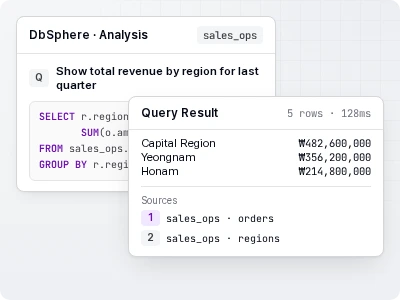
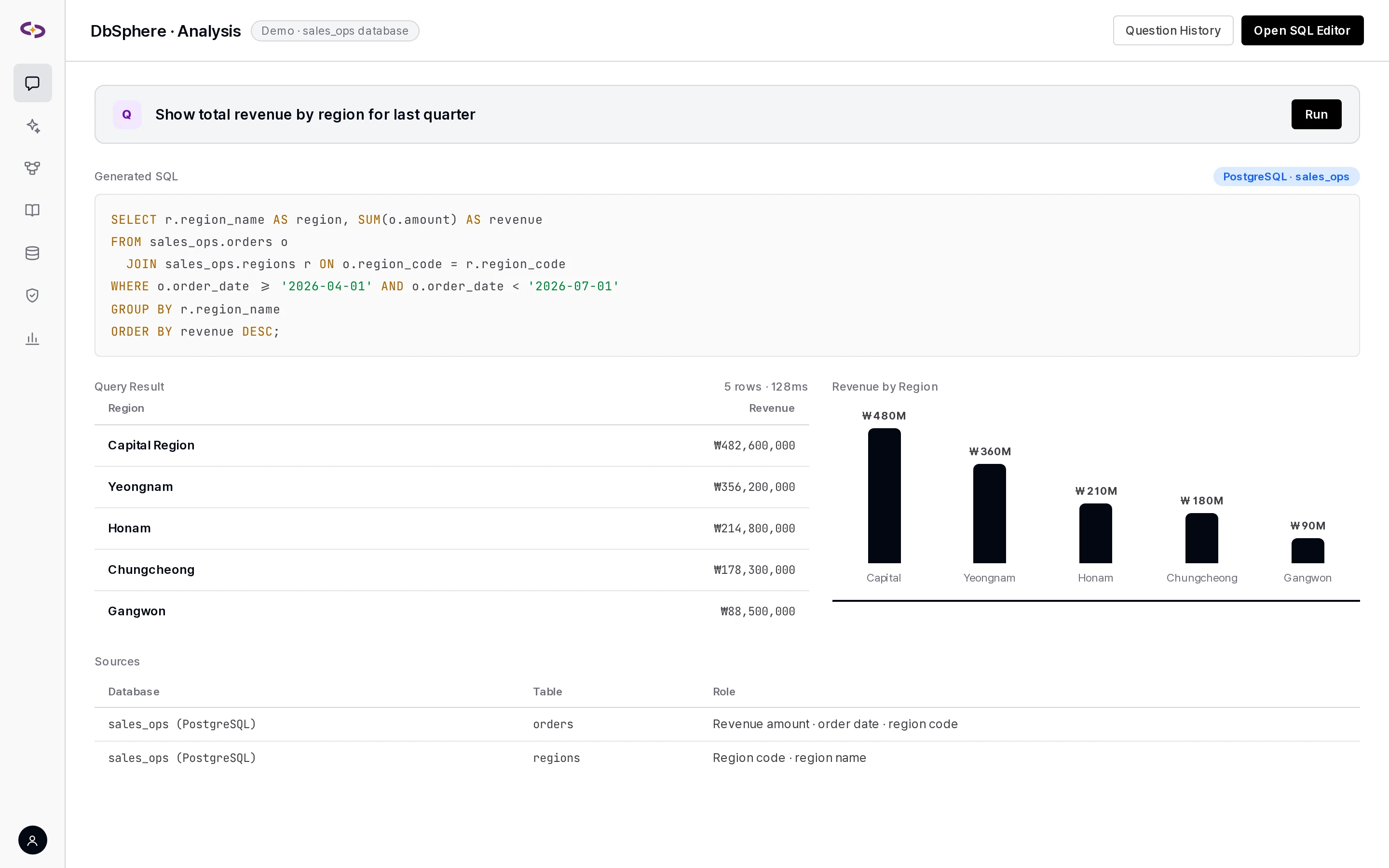
Business users ask in natural language, and the agent writes SQL and answers with tables and charts. The SQL that ran is shown as-is.
AI doesn't understand your company's language
Register internal definitions like "VIP customer" or "net sales" in the glossary, and they carry through into answers and SQL.
HWP files and scanned documents don't show up in search
Handles 14+ formats including HWP and HWPX, with a separate extraction engine assigned per file type.
Grounding answers in documents and databases
Knowledge Base
- Formats: PDF, Word, PowerPoint, Excel, CSV, HWP, HWPX, Markdown, HTML, XML, EPUB, email (EML/MSG), TXT, JSON, and 50+ code file types.
- Per-extension extraction engines: Choose an engine for each extension — for example, Azure Document Intelligence for PDFs and the built-in extractor for Excel. Scanned documents and images are handled with LLM Vision. An extension with no engine assigned is rejected on upload rather than silently falling back to another engine.
- Search: Hybrid search combining keyword and vector search with reranking, and semantic chunking.
- Library: Organize the Knowledge Base as a folder tree, and set the search scope and a "when to search this folder" description per folder for agents.
- Bulk processing: Upload entire folders, duplicate-file detection, automatic replacement of same-named files, and retries for failed files. Processing progress appears in the notification center and stays visible even if you switch screens.
Data analysis — natural language → SQL
- 8 databases: PostgreSQL · MySQL / MariaDB · Microsoft SQL Server · Oracle · Snowflake · Databricks · Google BigQuery · Azure Synapse.
- Connection test: A connection-test button checks table lists before you save. BigQuery uses Google Cloud default credentials with no key file, and Oracle supports read-only accounts and queries across other schemas.
- Answers: question → SQL written and run → table, chart, summary. Every SQL statement executed and its results are passed into the answer step so filters and aggregation logic are explained precisely.
- Multiple connected databases: When several databases are attached to an agent, the answer and the SQL-execution card show which database was chosen, why, and what was queried.
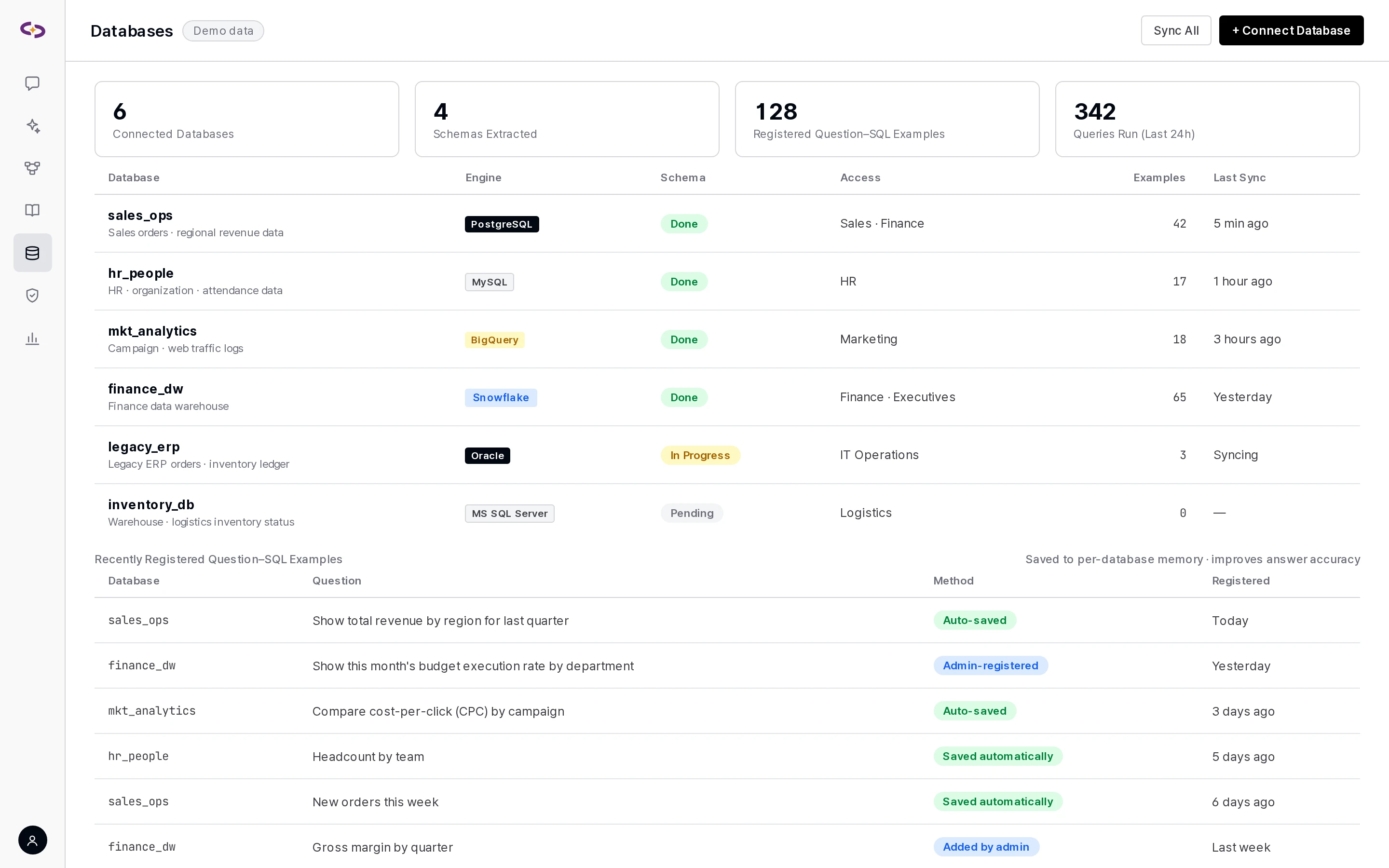
- Question–SQL example memory: Builds up verified question–SQL examples per database to improve accuracy. Only SQL confirmed to support the answer is saved automatically, and admins can also register or edit examples directly.
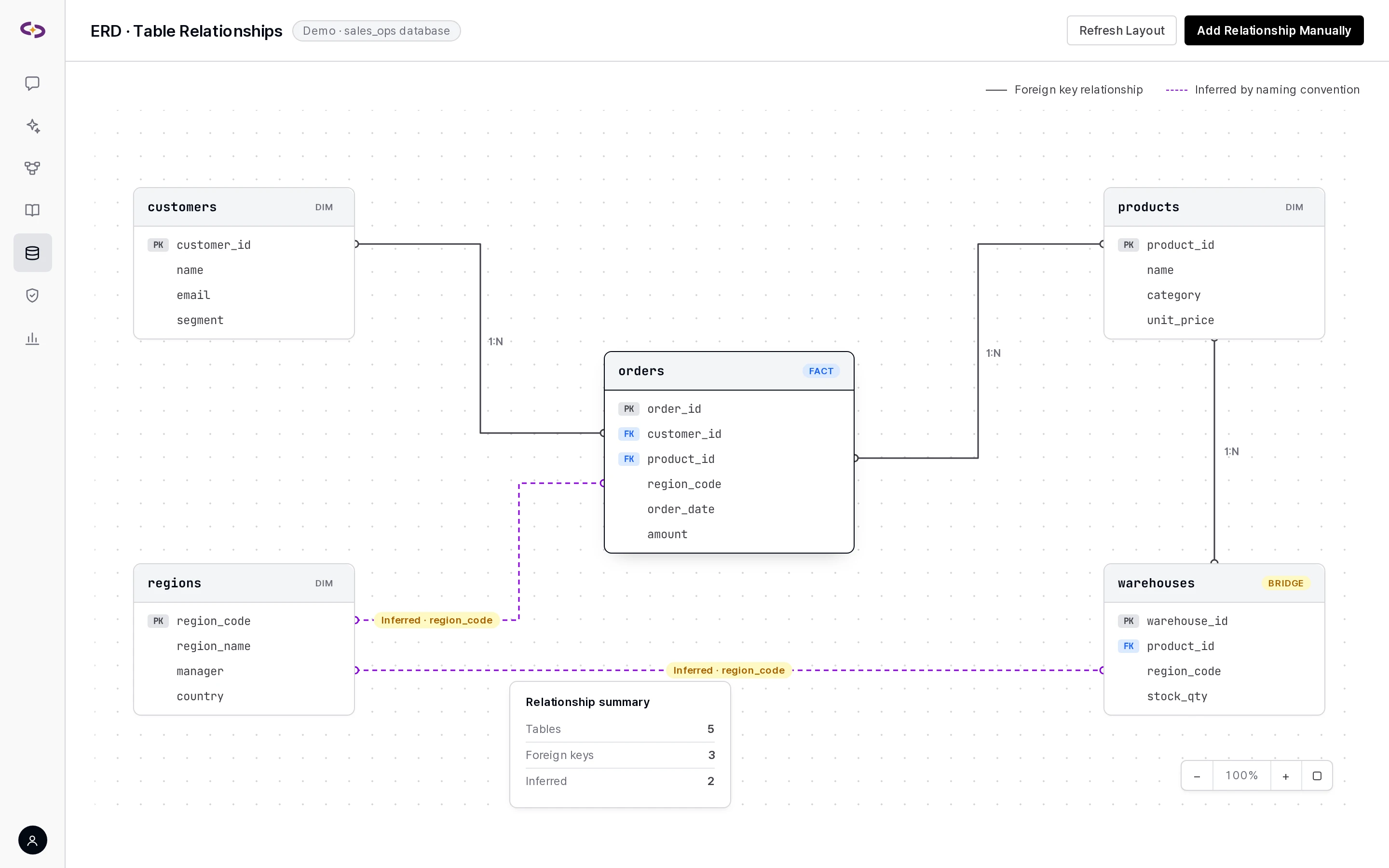
- Table relationship inference and ERD: Infers table relationships from foreign keys and column-naming conventions to build a join graph, with an ERD panel showing fact, dimension, and bridge table roles.
- SQL editor: Write and run SQL directly on screen, and save it to a file.
- Write-query approval: INSERT, UPDATE, and DELETE require a preview and approval before they take effect, and each database decides whether writes are allowed at all. Every execution, approval, and rejection is recorded in the SQL execution log.
- AI dashboard: Build a panel in natural language and the SQL is generated and validated; afterward it refreshes using the saved SQL.
Glossary
- Register internal terms and definitions, and they carry through into agent answers.
- Preview and bulk-register terms from Excel, CSV, or Markdown files. AI converts different formats into glossary entries, and a standard template file is also available to download.
- Pulls term candidates from database values for you to review and register.
- Category management and a history of term changes.
Knowledge graph
- Links business terms from the glossary, tables/columns/relationships from your databases, and Knowledge Base documents into a single graph.
- Extracts entities and relationships from documents and maps terms to column conditions — for example, "VIP customer" →
tier = 'VIP'. - Connect the knowledge graph to an agent and it automatically gains tools for resolving terms, finding related tables, and exploring neighboring nodes.
- Explore the graph on screen, filtering and searching by node type.
Knowledge base, data analysis, and glossary screens
An internal policy question is answered from source passages, with the document and page cited.
Related integrations
- 8 databases → Integration specs · Databases
- Document formats · extraction engines → Integration specs · Document formats
- 5 vector DBs · search indexes → Integration specs · Vector DB
The Knowledge Base and glossary are included from the Standard tier; data analysis and the AI dashboard from the Professional tier; the knowledge graph is included in the Enterprise tier. → Pricing · licensing
Related updates
Data analysis Only verified question–SQL examples are saved automatically
Data analysis Selection rationale for agents with multiple connected databases
Knowledge Base Knowledge Base library
We connect your own documents and databases and show it
We set up a demo environment based on your deployment method, integration scope, and governance requirements.